
Best Video Editing Apps for Dancers in 2026
ABCDancer, CapCut or Instagram? A fair 2026 comparison of video editors for dancers: song sync, sound quality, editing tools and price.
 Costi Mihai6 min read
On this page
Short answer: if the sound is what lets your dance video down, use ABCDancer. It finds the song in your video, lines up a clean, high-quality version of it under your dance, and lets you edit the whole video in the same app. If you want templates, motion tracking and a big effects library, CapCut does more. If you only want to post quickly, Instagram's own editor is enough.
We make ABCDancer, so keep that in mind as you read. We have tried to keep this comparison fair, and we say where the other apps do more. It reflects the three apps as of November 2026.
What dancers need from a video editor
Dance videos have problems most video editors were not built for:
- The music has to sound good. A phone filming at a social or in a studio records the room: echo, talking, and speakers turned up until they distort.
- The music has to stay in time with the dance. If the song is even slightly off, viewers see that the steps no longer land on the beat.
- Quick cutting tools. Trim the walk-on, cut the stumble, slow down a dip.
- The right shape and quality. A vertical format for Reels and Stories, saved without losing sharpness.
ABCDancer, CapCut and Instagram compared
| Feature | ABCDancer | CapCut | Instagram editor |
|---|---|---|---|
| Finds the song in your video and syncs a clean version to your dance | Yes, automatically | No, you line it up by hand | No, you line it up by hand |
| Trim, split and speed | Yes, including slow motion | Yes | Yes |
| Transitions between clips | Yes | Yes | Yes |
| Text and titles | Yes | Yes | Yes |
| Song lyrics on the video, in time with the music | Yes, with an English translation | Yes (auto lyrics) | Lyrics sticker, for songs from Instagram's library |
| Colour looks and adjustments | Yes | Yes | Filters |
| Several camera angles of one dance, synced by the song | Yes | By hand | No |
| Audience sound under the clean song | Yes | By hand, mixing tracks | Partly, by mixing your sound with the music |
| Motion or body tracking | No | Yes | No |
| Templates for intros and outros | No (you can add titles) | Yes | Yes |
| Save quality | Up to 4K, HDR kept | Up to 4K | Posts straight to Instagram |
| Price | Free to try | Free to try | Free |
ABCDancer

ABCDancer is an app for iPhone and Android, made for dancers who film to recorded music: salsa, bachata, kizomba, zouk, west coast swing, hip-hop, reggaeton and more.
How it works
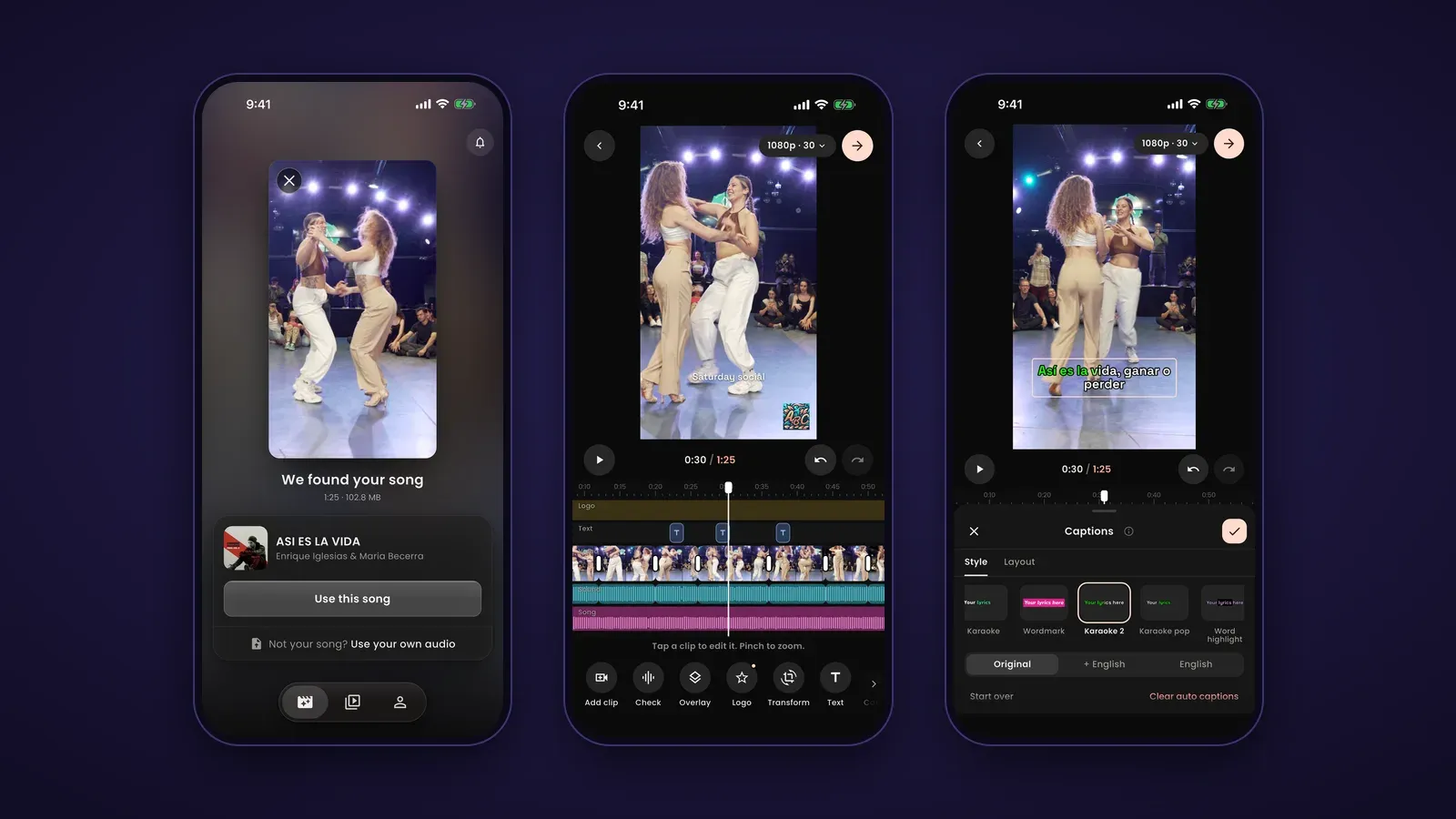
- Pick a video. The app listens to its sound and names the song.
- The song is synced for you. ABCDancer lines up a clean, high-quality version of the song with your recording, so the music plays exactly where your phone heard it. If it picks the wrong song, you can use your own audio, and you can fine-tune the sync by hand.
- Edit, save and share. Finish the video in the editor, save it, and share it to Instagram or your Stories from the same screen.
What you can do in the editor
- Add clips, split, trim and change the speed, including slow motion, with the song kept in sync
- Add transitions between clips, and In and Out animations on each clip
- Choose a format: 9:16 for Reels and Stories, 4:5, 1:1 or 16:9
- Zoom and crop with keyframes
- Fix club lighting with colour looks such as Night Fix and Neon Club, or adjust exposure and contrast by hand
- Add text, titles and the song's lyrics, timed to the music, in the song's language, in English, or both
- Pick the cover frame
- Combine several camera angles of the same dance, lined up by the song
- Keep the claps and cheers from your video under the clean song with audience audio
- Use AI edit: type what you want, like "make it cinematic", and it makes the change with the editor's tools (free with an account, up to a daily limit)
- Save in up to 4K, and HDR videos keep their HDR
Pros:
- The only one of the three that syncs the real song to your recording for you
- Built around dance videos: song sync, lyrics, multi-camera and audience sound in one app
- You can try every tool before you make an account
Cons:
- No motion or body tracking, and no template library
- Fewer effects and stickers than CapCut
- Free to download and try, no account needed to start
CapCut

CapCut is a full video editor for phones and computers, with a large library of effects, templates and AI tools. It is a strong choice when the visuals matter most.
Pros:
- Motion tracking, keyframes and masks
- A large library of effects, templates, intros and outros
- Text, auto captions and auto lyrics
- Works on both phone and desktop
Cons:
- No automatic sync of a clean song with your recording. You line it up by hand, by ear and by the waveform, which takes time and is easy to get slightly wrong
- So many tools that a quick dance clip can take longer than it should
- Many features need a CapCut Pro subscription
Instagram's editor

Instagram's built-in Reels editor is the fastest way to post. There is nothing extra to install, and you get Instagram's music library. Instagram also has a separate editing app, Edits, with more tools.
Pros:
- No extra app to install
- A large music library, with lyrics stickers
- Text, transitions and templates
- Simple to use
Cons:
- No way to sync a clean copy of the song you danced to with your recording. You can add the song from the library, but you line it up by hand
- Fewer editing tools than CapCut or ABCDancer
- The music you can use depends on Instagram's library, your account type and your region
Which one should you use?
- Your sound is bad, or you filmed at a social: ABCDancer. It fixes the sound for you and has the editing tools a dance video needs.
- You want effects, tracking or templates: CapCut. You can also sync the song in ABCDancer first, save the video, then add effects in CapCut.
- You want to post in a minute: Instagram's editor.
Frequently asked questions
What is the best app to edit dance videos?
It depends on what your video needs. For good sound that stays in time with your steps, ABCDancer, because it syncs the real song to your recording for you. For visual effects and templates, CapCut. For the quickest post, Instagram's editor.
How do I replace the bad sound in my dance video with the real song?
Use an app that matches the song to your recording. In ABCDancer you pick the video, the app finds the song and lines up a clean, high-quality version under your dance. In other editors you add the song yourself and move it until the beats line up.
Can CapCut sync music to my dance automatically?
CapCut can mark beats and cut clips to the music, but it does not find the song playing in your recording and line a clean copy up with it. You do that part by hand.
Is ABCDancer free?
You can find the song, sync it and try every editing tool for free, without an account. AI edit is free with an account, up to a daily limit.
Does ABCDancer work on Android?
Yes. ABCDancer is on the App Store and on Google Play.
Try it on your own video
See the steps from video to Instagram on our home page, how multi-camera editing works, and what AI edit can do. If you are looking for places to dance and film, read our guides to bachata schools in Amsterdam and salsa and bachata parties in Amsterdam.

More from the blog
More from the blog

Bachata Dance Schools in Amsterdam
Where to learn bachata in Amsterdam: Pasito, Bailemos, Extremos, I Love Salsa and Leeslo, with styles, locations and links. Updated November 2026.
Finding Salsa and Bachata Parties in Amsterdam
Where to dance salsa and bachata in Amsterdam: De Kroon's Latin nights, Summer Breeze, CanDance Studios, festivals, and how to find this week's parties.

Mastering Bachata: A Beginner's Guide to Learning This Dance
How to start learning bachata: find a good school, prepare for your first class, practise the basic step, and keep improving with online lessons and video.
Put the real song under your dance.
ABCDancer finds the song in your video and lines it up on the beat.